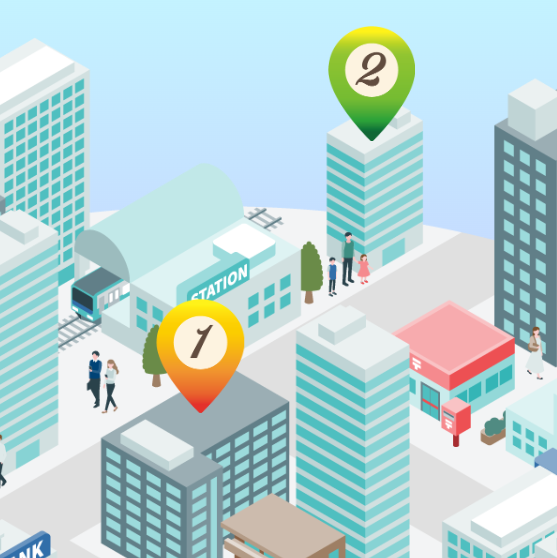
サンプルデータ
こういうやつです。(別画面で開きます)⇒ 画像の上にピン(リンク画像)を置く
データ見た方が分かると思うので ⇒ サンプルデータ(gazou-no-ue-ni-pin-link.zip)
いろんな書き方があるので、よかったら参考にしてみてください。
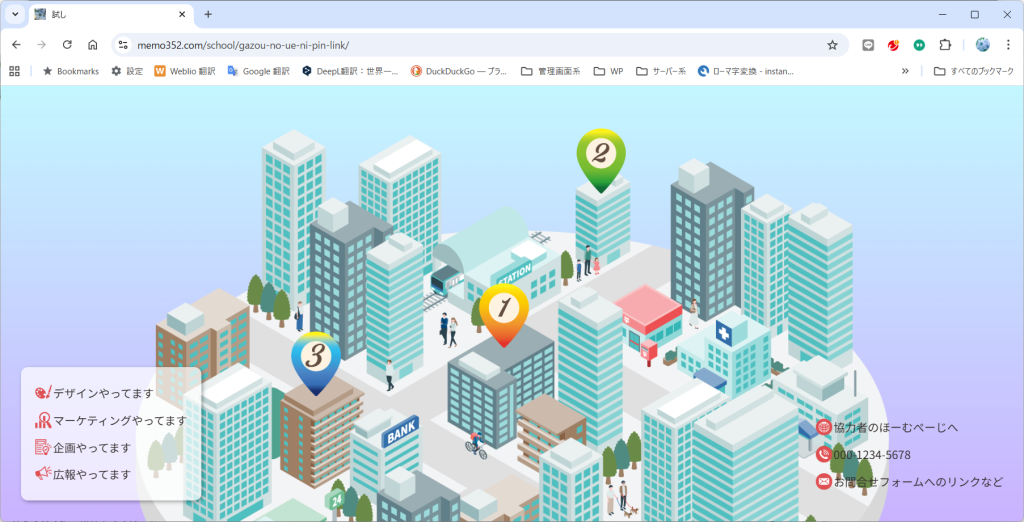
HTML
▼HTMLはこんな感じ
<!DOCTYPE html>
<html lang="ja">
<head>
    <meta charset="UTF-8">
    <meta name="viewport" content="width=device-width, initial-scale=1.0">
    <link rel="stylesheet" href="css/style.css">
    <title>試し</title>
</head>
<body class="front-page">

<div class="container"><!-- グラデーションの背景部分 -->

<div class="illust"><!-- イラストのブロックにピンを入れる -->
<img src="img/machi-nami.png" alt="">

<div class="pin pin-1">
<a href="#.html"><img src="img/pin-1.png" alt="ピン1"></a>
</div>

<div class="pin pin-2">
<a href="#.html"><img src="img/pin-2.png" alt="ピン2"></a>
</div>

<div class="pin pin-3">
<a href="#.html"><img src="img/pin-3.png" alt="ピン3"></a>
</div>

</div><!-- /.illust -->

<!-- 画面下 左のブロック -->
<div class="icon-block-1">

<div class="icon icon-1"><a href="#.html">デザインやってます</a></div>
<div class="icon icon-2"><a href="#.html">マーケティングやってます</a></div>
<div class="icon icon-3"><a href="#.html">企画やってます</a></div>
<div class="icon icon-4"><a href="#.html">広報やってます</a></div>

</div><!-- /.icon-block-1 -->

<!-- 画面下 右のブロック -->
<div class="icon-block-2">

<div class="icon hp">
<a href="https://memo352.com/" target="_blank">協力者のほーむぺーじへ</a>
</div>

<div class="icon tel">
<a href="tel:000-1234-5678"> 000-1234-5678</a>
</div>

<div class="icon mail">
<a href="#.html">お問合せフォームへのリンクなど</a>
</div>

</div><!-- /.icon-block-2 -->


</div><!-- /.container -->

</body>
</html>
CSS
▼CSSはこんな感じ ピンの位置は目分量で調節してください
@charset "UTF-8";

* {
    box-sizing: border-box; /* ボックスモデルの変更 */
    margin: 0; /* マージン0 */
    padding: 0; /* パディング0 */
}

img {
    max-width: 100%; /* 画像 最大横幅100% */
}


/* 全体囲み */
.container {
  background-image: linear-gradient(#c3f7ff, #cab2ff); /* 背景色 */
  height: 100vh; /* 高さ:画面の高さ */
  overflow: hidden; /* はみ出した部分を隠す */
}

/* 街並みイラスト部分 */
.illust{
  position: relative; /* ピンのポジション基準点 */
  width: min(1200px, 100%); /* 横幅:画面が広くても最大1200pxまで、それ以外は100% */
  margin: 0 auto; /* 要素外余白:上下0  左右の中央に */
}

/* 街並みイラスト部分の中の画像 */
.illust img{
  display:block; /* ブロック要素にしておく */
  width:100%; /* 横幅100% */
  height:auto; /* 高さなりゆき */
}

/*  ピン 共通 */
.pin{
  position:absolute; /* 絶対配置 */
  width: clamp(32px, 5vw, 70px); /* 横幅:複数指定(最小値、推奨値、最大値) */
  /* 最小:32px、推奨値(基準):画面幅の 5vw、最大:70pxで大きくなりすぎないように指定 */
}

/* ピン1 */
.pin-1{
  left: 49%; /* 左からの位置 */
  top: 36%; /* 上からの位置 */
  transform: translate(-50%, -50%); /* ピン画像の中心を基準点に */
  /* 画面が伸縮しても、ピンの位置がずれにくくするため */
}

/* ピン2 */
.pin-2 {
    left: 57.5%;
    top: 6.7%;
}

/* ピン3 */
.pin-3 {
    left: 24%;
    top:38.5%;
}

/* ピン マウスが重なった時の画像 */
.pin a:hover img {
  transition: transform 1s; /* アニメーション: 変形 1秒; */
  transform: rotateY(360deg);  /* 変形: Y軸を基準に350度; */
}

/* アイコン */
.icon,.icon a:hover {
background-repeat: no-repeat; /* 背景画像繰り返さない */
background-size: 23px auto ; /* 横幅 高さ */
margin: 15px 0; /* 要素外余白:上下 右左 */
}

/* アイコンの中のリンク */
.icon a {
    padding-left: 25px; /* 文字とイラストが重ならないように */
    text-decoration: none; /* リンク下線消す */
    color: #342d2d;  /* 文字色 */
    display: block; /* リンク全体が押せるように */
}

/* アイコンの中のリンク マウスが重なった時 */
.icon a:hover {
    background-color: rgba(82, 53, 144, 0.7); /* 背景色 */
    color: rgb(240, 240, 244);  /* 文字色 */
}

/* アイコン1 */
.icon-1 {
background-image: url(../img/icon-1.png); /* 背景画像 */
}

/* アイコン1 マウスが重なった時 */
.icon-1 a:hover {
background-image: url(../img/siro-icon-1.png); /* 背景画像 */
}


/* アイコン2 */
.icon-2 {
background-image: url(../img/icon-2.png); /* 背景画像 */
}
/* アイコン2 マウスが重なった時 */
.icon-2 a:hover {
background-image: url(../img/siro-icon-2.png); /* 背景画像 */
}


/* アイコン3 */
.icon-3 {
background-image: url(../img/icon-3.png); /* 背景画像 */
}
/* アイコン3 マウスが重なった時 */
.icon-3 a:hover {
background-image: url(../img/siro-icon-3.png); /* 背景画像 */
}


/* アイコン4 */
.icon-4 {
background-image: url(../img/icon-4.png); /* 背景画像 */
}
/* アイコン4 マウスが重なった時 */
.icon-4 a:hover {
background-image: url(../img/siro-icon-4.png); /* 背景画像 */
}

/* 協力者のほーむぺーじへ */
.hp {
background-image: url(../img/hp.png);  /* 背景画像 */
}

.hp a:hover {
background-image: url(../img/siro-hp.png); /* 背景画像 */
}

/* 電話番号 */
.tel {
background-image: url(../img/tel.png); /* 背景画像 */
}

.tel a:hover {
background-image: url(../img/siro-tel.png); /* 背景画像 */
}

/* お問合せフォームへのリンクなど */
.mail {
background-image: url(../img/mail.png);  /* 背景画像 */
}

.mail a:hover {
background-image: url(../img/siro-mail.png);  /* 背景画像 */
}

/* アイコン全体(左ブロック) */
.icon-block-1 {
background-color: rgba(255,255,255,0.7); /* 背景色 */
    position: fixed; /* 固定配置 */
    left: 2%; /* 左からの位置 */
    bottom: 5%; /* 下からの位置 */
    padding: 10px 20px 10px 20px; /* 要素内余白:上右下左 */
    border-radius: 10px; /* 角丸いする */
    box-shadow: 2px 2px 5px rgba(0, 0, 0, 0.3) ; /* ボックスに影つける */
    /* 左右の向きpx  上下の向きpx ぼかしpx 広がりpx 色 内側指定inset  */
}

/* アイコン全体(右ブロック) */
.icon-block-2 {
    position: fixed; /* 固定配置 */
    right: 2%; /* 右からの位置 */
    bottom: 5%; /* 下からの位置 */
}

/* パソコンでは電話発信をしない */
a[href^="tel:"] {
  pointer-events: none;
}


/* ▼ スマートフォン向けCSS 画面の横幅767px以下の場合 */
@media (max-width: 767px){
/* ▼ スマートフォン向けCSS 画面の横幅767px以下の場合 */

/* スマホのときだけ電話発信を有効にする */
  a[href^="tel:"] {
    pointer-events: auto;
  }

/* アイコン部分全体 固定配置解除 */
.icon-block-1 , .icon-block-2 {
    position: static;
    width: 90%; /* 横幅 */
    margin: 0 auto; /* 左右中央配置 */
}

/* 右ブロック縦に並んだ時に文字の位置を上とそろえるため */
.icon-block-2 {
    padding-left: 20px; /* 要素内余白左 */
}


/* ▲ スマートフォン向けCSS 画面の横幅767px以下の場合 */
}
/* ▲ スマートフォン向けCSS 画面の横幅767px以下の場合 */
メールについて
メールのところなんですけど、メーラーが立ち上がるのは個人的に好きでないので(笑) 書いていませんが、書きたい場合は、↓こんな感じ
<a href="mailto:info@example.com">メールを開く</a>個人的には、お問い合わせはフォーム使う方が好みですw Googleフォームへのリンクでも良いと思います。
電話について
▼電話の部分HTML
<a href="tel:000-1234-5678">
000-1234-5678
</a>
▼CSS
/* パソコンでは電話発信をしない */
a[href^="tel:"] {
  pointer-events: none;
}
@media (max-width: 767px) {
/* スマホのときだけ電話発信を有効に */
a[href^="tel:"] {
pointer-events: auto;
}
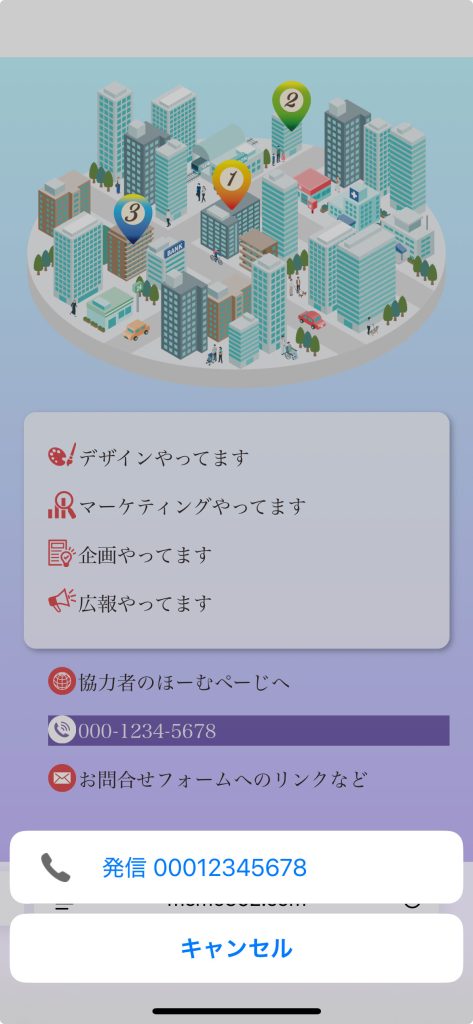
}スマホで電話部分をタップしたら
←こんな感じ。